MSP User Guide
Dashboard (Home)
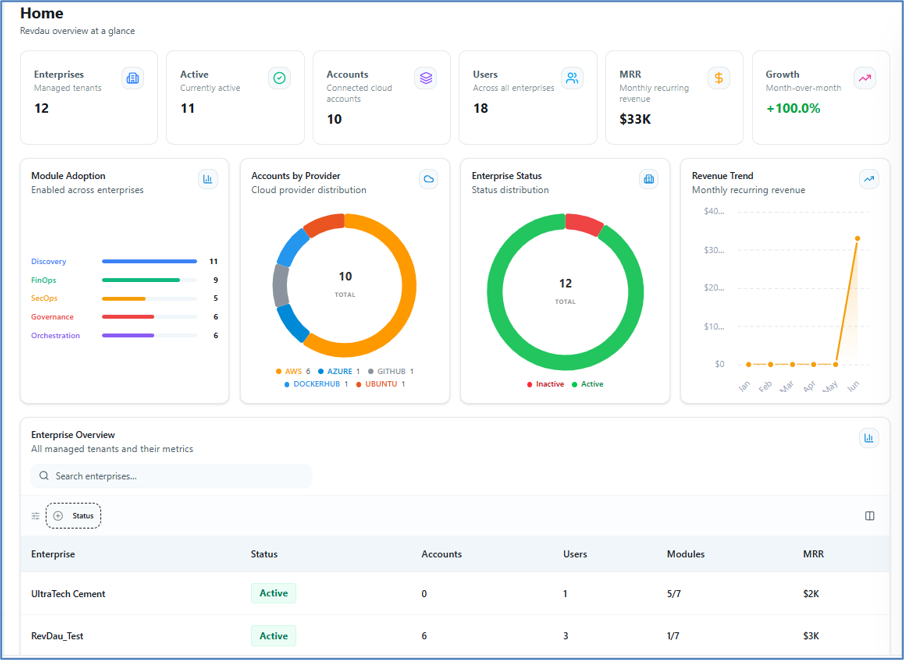
The Dashboard provides a real-time, executive-level view of your entire multi-cloud environment. Key metrics displayed include:
| Metric | Description |
|---|---|
| Enterprises | Total managed tenants |
| Active Enterprise | Currently active enterprises |
| Accounts | Connected cloud accounts |
| Users | Total users across all enterprises |
| MRR | Monthly Recurring Revenue |
| Growth | Month-over-month growth percentage |
| Module Adoption | Modules enabled across enterprises |
| Accounts by Provider | Cloud provider distribution breakdown |
| Enterprise Status | Active and inactive enterprise status |
| Revenue Trend | Monthly recurring revenue trend chart |
In the Home tab you will see multiple cards representing the metrics above. Clicking on the Enterprise card redirects you to the Enterprise page. Clicking on the Active Enterprise card also redirects to the Enterprise page but filters the view to show only active enterprises.
Enterprise Overview Table
The Enterprise Overview table lists all enterprises with the following attributes:
- Enterprise Name
- Status
- Accounts
- Users
- Modules
- Monthly Recurring Revenue (MRR)
View the full Enterprise Overview in a table view with these attributes.
Global Search
A global search bar is available at the top of the Dashboard to quickly locate enterprises, accounts, or users across the platform.