MSP User Guide
Profile Management
In the top‑right corner of the application you will see a profile avatar. Clicking the avatar opens a profile card that provides quick access to View Profile and Logout.
View Profile
The Profile page displays your personal information:
- First Name
- Last Name
- Your Role
- Your Status
- Last login date and time
Edit Profile
You can edit First Name and Last Name directly on the Profile page:
- Click the input box for First Name or Last Name.
- Make the desired changes.
- The Submit button becomes active; click it to save your updates.
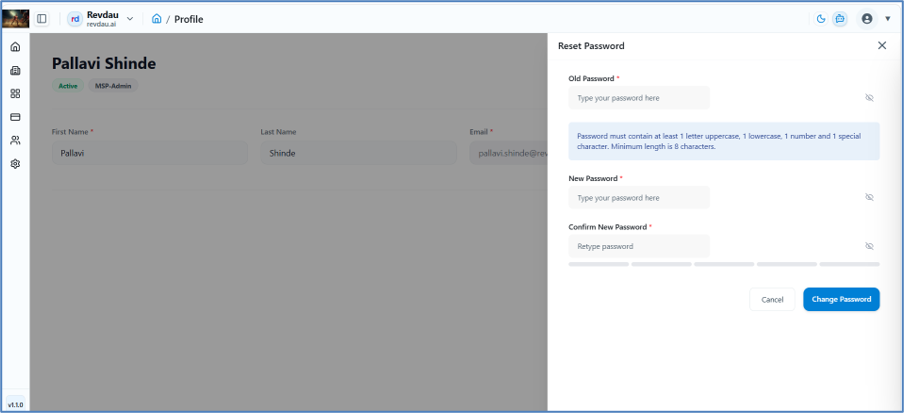
Change Password
To change your password, click Change Password on the profile card. A side panel opens with the following steps:
- Current Password – enter your existing password.
- New Password – enter the new password.
- Confirm Password – re‑enter the new password for verification.
- Click Change Password to apply the changes.