Dashboard (Home)
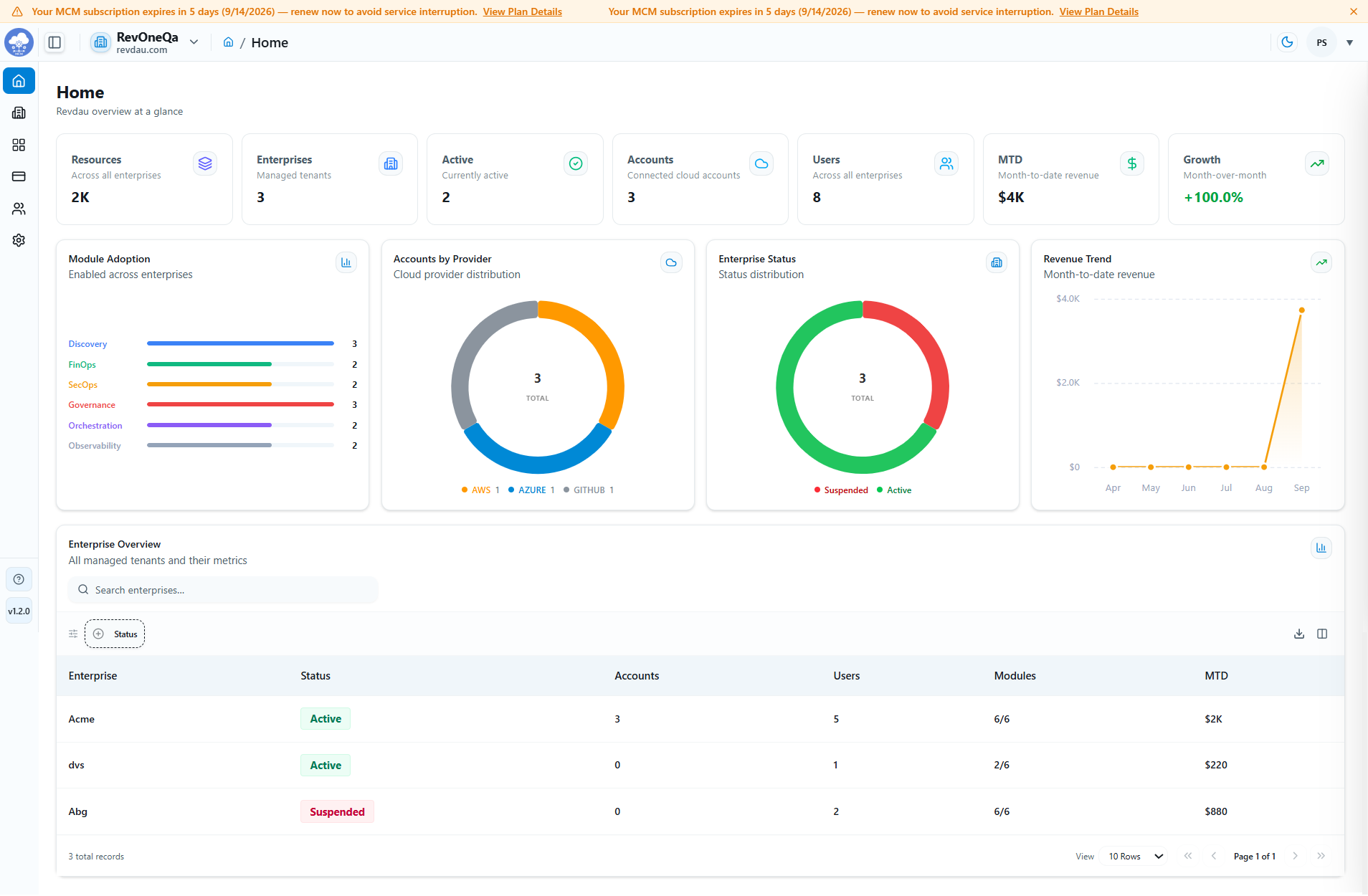
The Home Dashboard provides a centralized overview of all managed enterprises, connected cloud accounts, users, resource inventory, and revenue metrics. It serves as the primary landing page for administrators to quickly assess platform activity, module adoption, resource utilization, and enterprise status.
Dashboard Summary Cards
At the top of the dashboard, key metrics are displayed to provide an at-a-glance view of the platform environment.
Available Metrics
- Resources: Total number of cloud resources discovered across all enterprises.
- Enterprises: Total number of managed tenant organizations onboarded to the platform.
- Active: Number of enterprises that are currently active.
- Accounts: Total number of connected cloud accounts across supported providers.
- Users: Total number of users across all managed enterprises.
- MTD (Month-to-Date Revenue): Revenue generated during the current month.
- Growth: Month-over-month revenue growth percentage.
Module Adoption
The Module Adoption widget provides visibility into platform module usage across all enterprises.
Supported Modules
- Discovery
- FinOps
- SecOps
- Governance
- Orchestration
- Observability
The chart displays the number of enterprises with each module enabled, helping administrators track feature adoption and utilization.
Accounts by Provider
The Accounts by Provider chart displays the distribution of connected cloud accounts across supported providers.
Supported Providers
- AWS
- Microsoft Azure
- GitHub
This visualization helps administrators understand cloud provider adoption and account distribution across managed enterprises.
Enterprise Status
The Enterprise Status chart provides an overview of enterprise operational status.
Status Types
- Active: Enterprises that are currently enabled and operational.
- Suspended: Enterprises that have been temporarily disabled or restricted.
This chart offers a quick health check of the managed environment.
Revenue Trend
The Revenue Trend graph displays month-to-date revenue across recent months.
Administrators can use this chart to:
- Track revenue performance.
- Identify business growth patterns.
- Monitor revenue trends over time.
- Analyze financial performance across reporting periods.
Enterprise Overview
The Enterprise Overview table provides detailed information for each managed enterprise.
Available Columns
| Column | Description |
|---|---|
| Enterprise | Name of the managed enterprise |
| Status | Current enterprise status (Active or Suspended) |
| Accounts | Number of connected cloud accounts |
| Users | Number of associated users |
| Modules | Number of enabled modules |
| MTD | Month-to-date revenue generated by the enterprise |
Enterprise Search and Filtering
Administrators can use the Search Enterprises field and available filters to quickly locate enterprises based on:
- Enterprise name
- Enterprise status
- Available filter criteria
This functionality improves navigation and simplifies enterprise management.
Export and Pagination
The Enterprise Overview section supports several data management features.
Export Options
Administrators can export Enterprise Overview data in the following formats:
- CSV
- Excel
Additional Features
- Pagination controls for navigating large datasets.
- Configurable row count selection.
- Quick access to table navigation controls.
Benefits
The Home Dashboard enables administrators to:
- Monitor enterprise activity from a single location.
- Track cloud account distribution across providers.
- Monitor platform module adoption trends.
- View enterprise operational status.
- Analyze revenue performance and growth metrics.
- Quickly access enterprise-specific information.
- Export Enterprise Overview data in CSV, Excel, and PDF formats for reporting and auditing purposes.
- Gain actionable insights through visual charts and dashboard metrics.